TimeBack: Blocks Reels and Shorts to Reduce Screen Distraction
Hides Instagram Reels, YouTube Shorts and similar infinite-scroll segments while tracking your daily screen time and session limits. Developed by Urban VPN, this Android productivity app ties blocking, schedules, and a visual wellbeing meter into one workflow. Key functions include granular content blocking, hour-by-hour charts, and a focus mode, all available without an account. It fits students and professionals who need strict control over social feeds during work or study hours.
How granular blocking targets distracting content
TimeBack focuses on sub-features rather than whole apps: it can hide Reels, Shorts, and Stories so the rest of an app remains usable. Blocking uses Android Accessibility permissions to remove or hide those feed elements, and a website blocker works with mobile browsers such as Chrome, Brave, and Edge. That approach lets you keep messaging and search functions while removing the specific feeds that prompt extended scrolling.
How the app structures goal-setting and daily output
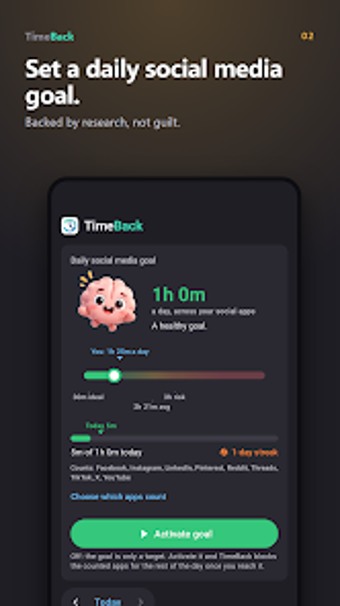
The workflow centers on daily social media goals and session limits. You set a daily time cap and the app pauses defined social apps once the cap is reached until midnight. A visual "friendly brain" indicator displays wellbeing status, and a seven-day history with hour-by-hour charts shows how usage changes across workdays and weekends, supporting repeated adjustments to schedules and limits.
Onboarding, permissions, and the learning curve
Setup requires no account, reducing initial friction, but the app asks for Usage Access and Accessibility permissions to track and block effectively. That combination lets the app enforce content-level blocking, but it means users must grant device-level access during setup. Urban VPN provides an ad-free interface and a straightforward setup path, which lowers the training need for individuals compared with enterprise deployment.
Compatibility, performance, and data handling
TimeBack runs on Android devices and needs Android 7.0 or later for full content-blocking features. The developer states screen time data and settings remain on the phone, though an advertising ID is shared with partners for campaign attribution. Focus mode and scheduled blocks operate locally, which supports offline enforcement during work sessions and study blocks.
TimeBack suits workers who need precise control over social feeds
TimeBack works well for students and professionals who want targeted removal of infinite-scroll content and local enforcement of limits. Its zero-account setup and device-resident controls favor individuals who prefer not to sync data to servers; however, the Accessibility and Usage Access requirements mean administrators should plan permission steps for workplace deployments. TimeBack fits users who accept device-level permissions in exchange for focused feed control.